What Is a Dynamic Metronome?
A dynamic metronome — you will also see it called a tempo ramp, an accelerating metronome or a progressive metronome — speeds itself up while you play. You pick a starting tempo, a step size (say +5 BPM) and an interval (say every 4 bars), press play, and the click climbs on its own: 80, 85, 90, 95… You never touch the phone again until you stop.
That sounds like a small convenience. In practice it changes how a whole practice session feels — and what it gets you. Here are five reasons to make it your default for speed and endurance work.
You Stay in the Music Instead of in the Settings
Every manual tempo change costs you more than the two seconds it takes. You stop playing, put down a stick, find the +5 button, restart the click, count yourself back in, and then spend another few bars getting the groove back under your hands. Do that eight times in a session and you have interrupted yourself eight times.
With a tempo ramp, the tempo changes and you do nothing. Your attention stays on the things that actually need it: stick height, grip, the sound of your weak hand, whether your hi-hat foot is still relaxed. One long, unbroken take instead of ten short ones.
Example:
❌ Play 4 bars → stop → tap +5 → restart
→ find the groove again
✅ Press play once and stay on the kit for eight straight
minutes
You Practice a Tempo Range, Not Your Three Favourite BPMs
Be honest: when you set the click by hand, you set the same handful of numbers every time. The tempo where the pattern feels good. The round number you have always used. Your personal best, once, at the end, for the ego. Everything between those tempos stays untrained.
That is a problem, because music does not respect your favourite numbers. A song at 138 does not care that you practised at 120 and 160. A dynamic metronome sweeps through the whole range and makes you play every tempo on the way — including the awkward ones where your pattern has to reorganise itself, which are exactly the ones you have been avoiding.
Example:
❌ 100 · 120 · 160, every session, forever
✅ 100 → 102 → 104 → … → 160,
every tempo in between actually played
Your Warm-Up Is Built Into the Exercise
Warming up is the part everyone knows they should do and half of us skip, because it feels like a delay before the "real" practice. A tempo ramp removes the choice: start the ramp 20–30 BPM below your working tempo and the first couple of minutes are your warm-up. Slow, clean, relaxed strokes — and they are already part of the exercise you came to practise.
Your hands, wrists and forearms get to ease in gradually instead of being thrown at your top speed cold. That is better for your playing and kinder to your tendons — and by the time you reach the tempo you actually care about, you are already loose.
Progressive Overload — and It Shows You What Breaks First
Every strength athlete knows the principle: add a little load, consistently, and the body adapts. Drumming works the same way, except most of us never add the load — we park at a comfortable tempo and call it practice. A ramp adds the load for you, in steps small enough that your technique adapts instead of collapsing.
The second benefit is diagnostic. When the tempo creeps up continuously, you do not just find out that you have a limit — you feel what gives way first. Shoulders tightening at 150. The weak hand losing volume at 165. Your grip strangling the stick at 175. That is a concrete thing to fix in your next session, which "I plateau around 170" never is.
What to do with it:
Stop the ramp at the first sign your sound breaks down, not when your speed does. Note the BPM and what gave way. Next session, start 10 BPM below that number and work on that specific weakness.
Don't Look at the BPM — Surprise Yourself
This one is worth trying before you judge it. Take a ramp session where you simply do not look at the display. Play until the pattern genuinely falls apart, stop, and only then read the number.
It may well be higher than the tempo you would have set by hand. Because a number on a screen is never just a number — it comes with a story attached. "180 is my max." "I can't play sixteenths past 160." The moment you see the tempo cross that line, the story does the work of stopping you, before your hands ever get a vote. Take the display away and the only thing left to judge is the sound coming off the drum.
You are not measuring what you think you can do any more. You are measuring what you can do.
How to Set Up a Dynamic Metronome Session
Two settings decide everything: how much the tempo jumps, and how often. Small steps over many bars build technique; big steps over few bars find your limit. Here are starting points that work:
| Your goal | Step | Interval |
|---|---|---|
| Speed building (singles, doubles, rudiments) Start 20 BPM below your comfortable tempo. | +2 BPM | every 4 bars |
| Groove & endurance Long, slow climb. Watch your tension, not the clock. | +1 BPM | every 8 bars |
| Fills & limb independence Enough repetitions per tempo to actually clean up the fill. | +5 BPM | every 8 bars |
| Max speed test Short session. Stop the moment the sound breaks down. | +5 BPM | every 2 bars |
Three rules that make the difference between a useful ramp and a frustrating one: start clearly below your comfortable tempo, keep the pattern short enough to repeat cleanly, and stop when the sound degrades — not when you can no longer physically keep up. Speed you can only produce with a tense, ugly stroke is not speed you own yet.
Dynamic Mode in Drumbitious
Dynamic mode is the newest addition to the Drumbitious metronome, and it sits right inside your practice — in the warm-up and on every exercise, not in a separate app you have to juggle.
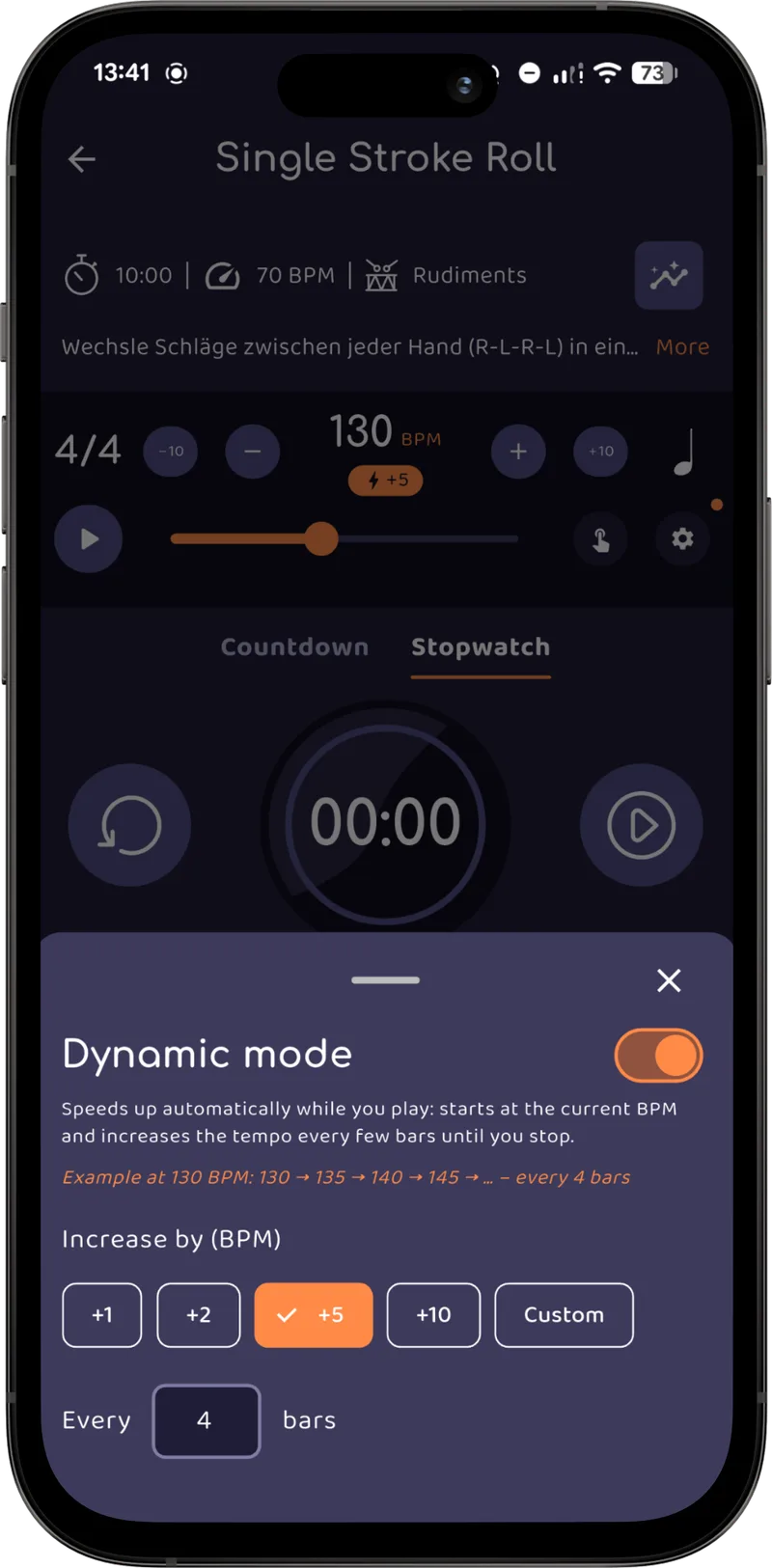
- Tap the Dynamic chip under the BPM readout, set your step (1–50 BPM) and how many bars between steps (1–99). A live example shows exactly what will happen — at 130 BPM with +5 every 4 bars: 130 → 135 → 140 → 145 → …
- The ramp is open-ended — it keeps climbing until you stop it. Nothing to reset, no ceiling to decide on in advance.
- When you stop, the dial keeps the tempo you actually reached — so the number you just earned is the one that gets logged with the exercise.
- Starting the metronome also starts your practice timer, so a ramp session is tracked end to end without a single extra tap.
- Every practised BPM flows into your statistics — highest BPM, BPM trend over time, and per-exercise averages. Reason 2 becomes visible instead of theoretical.
Dynamic mode is a premium feature. The metronome itself — BPM, play/stop, tap tempo, volume and the timer sync — is free, so you can build the habit first and turn on the ramp when you want it.
💡 Pro Tip
Turn your phone face-down or place it out of your eyeline for the whole ramp, then check the BPM only after you stop. Log that number in Drumbitious along with how it felt. After a few weeks you will have a BPM trend built from what your hands did — not from what you believed they could do.
Three Mistakes to Avoid
Steps that are too big
+10 BPM every 2 bars is not practice, it is a stress test. Use it deliberately, rarely. For real gains, keep the step small enough that you barely notice it.
Starting at your target tempo
If the ramp starts where it already feels hard, you skip the warm-up and the useful middle range. Start low. The climb is the point.
Chasing the number instead of the sound
A tempo ramp is a great way to practise playing badly very fast if you let it be. Even and controlled beats fast every single time — the speed follows.
Frequently Asked Questions
What is a dynamic metronome?
A dynamic metronome — also called a tempo ramp, accelerating metronome or progressive metronome — automatically increases the tempo while you play. You set a starting BPM, a step size (for example +5 BPM) and how often it should speed up (for example every 4 bars). The click then climbs on its own, so you never need to stop playing to change the tempo.
Is a dynamic metronome better than a normal metronome?
It is better for anything where tempo is the variable you are training: speed building, endurance, and testing your real limit. A fixed click is still the right tool when you are learning a new pattern, working on timing at one specific song tempo, or recording. Most drummers use both — fixed click to learn it, tempo ramp to push it.
How much should I increase the BPM per step?
Small steps beat big jumps. For technique and speed work, +1 to +2 BPM every 4 to 8 bars is enough to be almost unnoticeable while still adding up to 20–40 BPM over a few minutes. Use +5 or +10 BPM steps only for quick warm-ups or when you deliberately want to find your breaking point.
Should I look at the BPM while I practice?
Try a few sessions without looking. Drummers tend to attach a story to a number ("175 is my max"), and that expectation becomes a ceiling. If you cannot see the display, you play until the sound actually breaks down instead of until the number says you should — which is often noticeably faster.
Does Drumbitious have a dynamic metronome?
Yes. Dynamic mode is built into the Drumbitious metronome inside warm-up and every practice session. Tap the "Dynamic" chip under the BPM readout, choose a step size (1–50 BPM) and an interval (every 1–99 bars), and the metronome ramps until you stop it. The tempo you reach is kept and logged with your session, so it shows up in your statistics. The advanced metronome, including Dynamic mode and subdivisions is a premium feature - The basic metronome is free.
Try the Dynamic Metronome in Your Next Session
Set a step, press play once, and find out what your hands can really do. Drumbitious tracks the BPM you reach, the time you practised and how it felt — automatically.